

Why to write Custom Partitioner?
You can store the output result as partitions for better accessibility of desired output as per your requirement/conditions. Partitioner comes between Mapper and Reducer.
Hadoop MapReduce program uses a default partitioner called HashPartitioner, which uses hash value for the key and divides it by number of Reducers defined in the driver program. In some cases, we want to store the output data based on our conditions. Lets say for a very simple example, you want to store the words starting with character ‘s’ in one file, and you want to store all words starting with ‘k’ in another output file. In that case, you can write custom partitioner as given below by extending the word count program
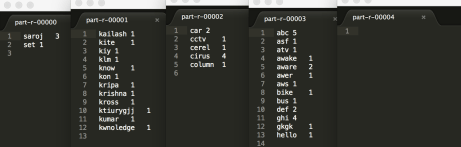
We have used org.apache.hadoop.mapreduce.Partitioner instead of org.apache.hadoop.mapreduce.lib.partition.HashPartitioner. In this program, We are checking if the first character starts with ‘s’, then send the mapper output to first reducer. And if the first character starts with character ‘k’, send the mapper output to 2nd reducer and so on. if nothing matches, send the remaining mapper output to 4th reducer.
package com.demo.tool;
import org.apache.hadoop.io.IntWritable;
import org.apache.hadoop.io.Text;
import org.apache.hadoop.mapreduce.Partitioner;
import org.slf4j.Logger;
import org.slf4j.LoggerFactory;

public class MyCustomPartitioner extends Partitioner<Text, IntWritable> {
	private static Logger logger = LoggerFactory.getLogger(MyCustomPartitioner.class);

	public int getPartition(Text key, IntWritable value, int numOfReducers) {
		logger.info("inside the getPartiion method");
		String str = key.toString();
		if(str.charAt(0) == 's'){
			return 0;
		}
		if(str.charAt(0) == 'k'){
			return 1%numOfReducers;
		}
		if(str.charAt(0) == 'c'){
			return 2%numOfReducers;
		}
		else{
			return 3%numOfReducers;
		}
	}
Here is the driver class, which is little different than the WordCount(Hello World) program. Here 2 extra lines we have used.
job.setPartitionerClass(MyCustomPartitioner.class);
job.setNumReduceTasks(4);
package com.demo.tool;

import org.apache.hadoop.conf.Configuration;
import org.apache.hadoop.conf.Configured;
import org.apache.hadoop.fs.Path;
import org.apache.hadoop.io.DoubleWritable;
import org.apache.hadoop.io.IntWritable;
import org.apache.hadoop.io.Text;
import org.apache.hadoop.mapreduce.Job;
import org.apache.hadoop.mapreduce.lib.input.FileInputFormat;
import org.apache.hadoop.mapreduce.lib.output.FileOutputFormat;
import org.apache.hadoop.util.Tool;
import org.apache.hadoop.util.ToolRunner;
import org.slf4j.Logger;
import org.slf4j.LoggerFactory;

/**
 * @author sarojrout
 *
 */
public class WordCountDriver extends Configured implements Tool{
	private static Logger logger = LoggerFactory.getLogger(WordCountDriver.class);
	public static void main(String[] args) throws Exception {

		Configuration conf = new Configuration();
		int exitCode = ToolRunner.run(conf, new WordCountDriver(), args);
		System.exit(exitCode);
	}

	public int run(String[] args) throws Exception {
		if (args.length != 2) {
			logger.debug("Usage: WordCount  \n");
			System.exit(-1);
		}
		/*
		 * Instantiate a Job object for your job's configuration.
		 */
		Job job = Job.getInstance(getConf());
		job.setJarByClass(WordCountDriver.class);
		job.setJobName("Word Count Job");
		FileInputFormat.setInputPaths(job, new Path(args[0]));
		FileOutputFormat.setOutputPath(job, new Path(args[1]));
		job.setMapperClass(WordCountMapper.class);
		job.setReducerClass(WordCountReducer.class);
		job.setPartitionerClass(MyCustomPartitioner.class);
		job.setNumReduceTasks(5);
		job.setMapOutputKeyClass(Text.class);
		job.setMapOutputValueClass(IntWritable.class);


		/*
		 * Specify the job's output key and value classes.
		 */
		job.setOutputKeyClass(Text.class);
		job.setOutputValueClass(IntWritable.class);

		/*
		 * Start the MapReduce job and wait for it to finish. If it finishes successfully, return 0. If not, return 1.
		 */
		boolean success = job.waitForCompletion(true);
		return (success ? 0 : 1);
	}

}
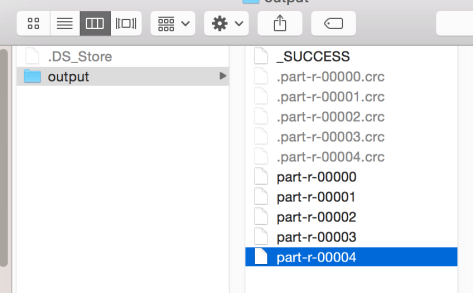
Important Note: If you define number of reducer in your driver program as job.setNumReduceTasks(5); It will generate 5 output files. But the 5th output file would be empty. Because in our Partitioner program, we have handled till 4th reducer. Look at the screenshots below.
 Your Ultimate Tech Guide