

Word Count program is the Hello World of Hadoop MapReduce framework.
I am going to write a WordCount program, which takes a text file as input and then generate a output that shows how frequently a word appeared in the text file.
You can download the source code from here.
To write a simple MapReduce program, you just need to write 3 classes. Thats all.
1. Mapper class
2. Reduce class
3. Driver class
Mapper Class: It receives the content of input file and takes one line a time and splits the content into words and then
it writes every word into an output and sets frequency count for that word to 1, by calling context.write(word,new IntWritable(1)). Below is the source code.
package com.demo.tool;
import java.io.IOException;
import org.apache.hadoop.io.IntWritable;
import org.apache.hadoop.io.LongWritable;
import org.apache.hadoop.io.Text;
import org.apache.hadoop.mapreduce.Mapper;
import org.apache.hadoop.mapreduce.Mapper.Context;
import org.slf4j.Logger;
import org.slf4j.LoggerFactory;

/**
* @author sarojrout
*
*/
public class WordCountMapper extends Mapper<LongWritable, Text, Text, IntWritable> {
private static Logger logger = LoggerFactory.getLogger(WordCountMapper.class);
@Override
public void map(LongWritable key, Text value, Context context)
throws IOException, InterruptedException {
logger.info("Entering inside the map method");
String line = value.toString();
for(String word:line.split("\\W+")){
if(word.length()>0){
context.write(new Text(word), new IntWritable(1));
}
}
logger.info("exiting the method map method");
}
}
Reducer Class: This class receives the input which is the output of Mapper class. Do not get confused. So, the reducer will
take the input , which is a map of key(as the word received from mapper class) and value is list of all the int values for example
if your input file is simple text like which contains the content as saroj kumar rout abc def abc, then reduce class will get
called with saroj – [1], kumar -[1], rout- [1], def -[1] and abc – [1, 1] as input. Hadoop framework takes care of
collecting output of Mapper and then converting it into key -[value,value] format.
In the reducer we just need to iterate through all the values and come up with a count.
Then, you need to write as output of Reducer by calling context.write(key, new IntWritable(count));
package com.demo.tool;
import java.io.IOException;
import org.apache.hadoop.io.DoubleWritable;
import org.apache.hadoop.io.IntWritable;
import org.apache.hadoop.io.Text;
import org.apache.hadoop.mapreduce.Reducer;
import org.apache.hadoop.mapreduce.Reducer.Context;

public class WordCountReducer extends Reducer<Text, IntWritable, Text, IntWritable>{
@Override
public void reduce(Text key, Iterable values, Context context) throws IOException, InterruptedException {
int count = 0;
for(IntWritable value: values){
count +=value.get();
}
context.write(key, new IntWritable(count));
}
}
Driver Class: This is the last Java program. This is responsible for triggering the map reduce job in Hadoop by setting the name of job,
setting up inputs, defining output key value data types and sets the mapper and reducer classes.
After initializing Hadoop it calls job.waitForCompletion(true), this method will take care of passing the control to Hadoop framework and wait for the job to complete.
package com.demo.tool;
import org.apache.hadoop.conf.Configuration;
import org.apache.hadoop.conf.Configured;
import org.apache.hadoop.fs.Path;
import org.apache.hadoop.io.DoubleWritable;
import org.apache.hadoop.io.IntWritable;
import org.apache.hadoop.io.Text;
import org.apache.hadoop.mapreduce.Job;
import org.apache.hadoop.mapreduce.lib.input.FileInputFormat;
import org.apache.hadoop.mapreduce.lib.output.FileOutputFormat;
import org.apache.hadoop.util.Tool;
import org.apache.hadoop.util.ToolRunner;
import org.slf4j.Logger;
import org.slf4j.LoggerFactory;

public class WordCountDriver extends Configured implements Tool{
private static Logger logger = LoggerFactory.getLogger(WordCountDriver.class);

public static void main(String[] args) throws Exception {

Configuration conf = new Configuration();
int exitCode = ToolRunner.run(conf, new WordCountDriver(), args);
System.exit(exitCode);
}

public int run(String[] args) throws Exception {
if (args.length != 2) {
logger.debug("Usage: WordCount  \n");
System.exit(-1);
}
/*
* Instantiate a Job object for your job's configuration.
*/
Job job = Job.getInstance(getConf());
job.setJarByClass(WordCountDriver.class);
job.setJobName("Word Count Job");
FileInputFormat.setInputPaths(job, new Path(args[0]));
FileOutputFormat.setOutputPath(job, new Path(args[1]));
job.setMapperClass(WordCountMapper.class);
job.setReducerClass(WordCountReducer.class);
job.setMapOutputKeyClass(Text.class);
job.setMapOutputValueClass(IntWritable.class);

/*
* Specify the job's output key and value classes.
*/
job.setOutputKeyClass(Text.class);
job.setOutputValueClass(IntWritable.class);

/*
* Start the MapReduce job and wait for it to finish. If it finishes successfully, return 0. If not, return 1.
*/
boolean success = job.waitForCompletion(true);
return (success ? 0 : 1);
}
}
Now, lets say, you have a input file in your local machine called myinputfile and it contains the content as below.
abc def asf set saroj kumar saroj cctv car saroj
column abc abc def ghi klm ghi ghi ghi abc abc
kite kailash gkgk kiy hello atv ktiurygjj awer aware
aws car cirus cirus cirus cirus aware awake bike bus
cerel kon kross kwnoledge know kripa krishna
You can run the Driver program either from your eclipse as Run as Java Application or you can build the jar out of it and can run the jar in your hadoop cluster.
Please look at the below screenshot to run the program from eclipse. Select the Run Configuration
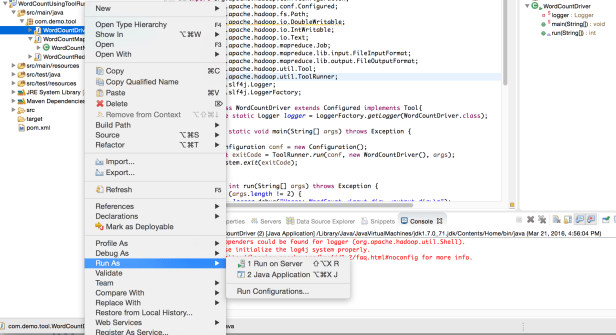
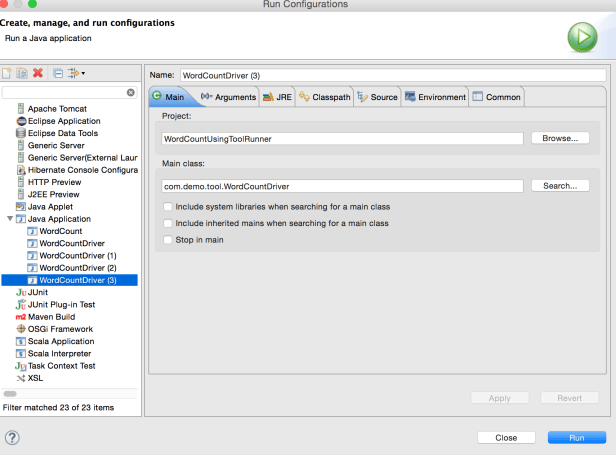
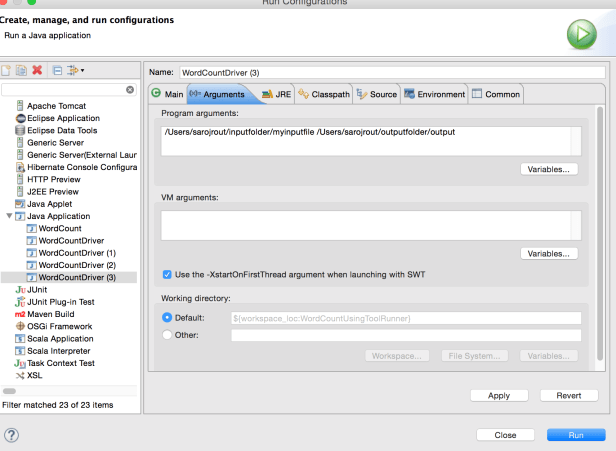 After you run the program, you should be seeing an output folder in your local machine inside /outputfolder as below
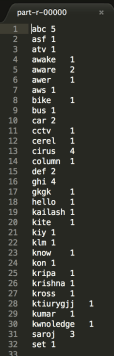
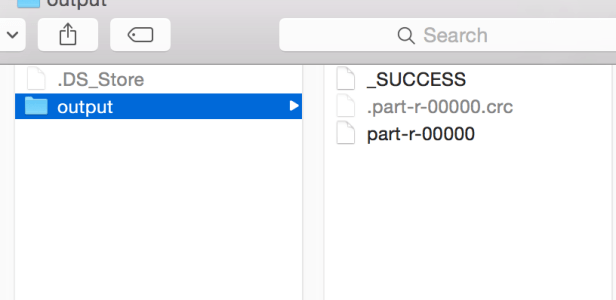 And if you open the part-r-00000, you should see the below output
To run the program in hadoop FS, use the below commands
1. First, create a folder inside hadoop as executing the below command
Create a folder inside hadoop file system as
$HADOOP_HOME/bin/hadoop fs -mkdir hdfs_inputdir2. Copy the local file(myinputfile) into hadoop file system inside the hdfs_inputdir
$HADOOP_HOME/bin/hadoop fs -put /Users/saroj/inputfolder/myinputfile hdfs_inputdir3. Verify if your input file copied inside hadoop folder(hdfs_inputdir)
$HADOOP_HOME/bin/hadoop fs -ls hdfs_inputdir/ 4. Run the jar inside hadoop
$HADOOP_HOME/bin/hadoop jar wordcount.jar hdfs_inputdir output 5. After the job runs, you can verify the results inside the output directory
$HADOOP_HOME/bin/hadoop fs -ls output/6. To view the result, use the following command
$HADOOP_HOME/bin/hadoop fs -cat output/part-0000007. You can also copy the result file from hadoop FS into your local FS by using the below command
$HADOOP_HOME/bin/hadoop fs -cat output/part-00000/bin/hadoop dfs get output /Users/saroj
Please note that, the local file system(/Users/saroj) would be different based on your local file system.
Its specific to my local machine.:) Please do not get confused. This quote is for the learner and for Windows users
 Your Ultimate Tech Guide