

Spend 5 mins to build a Node JS app with Express
Look at the steps below:
PreRequisites: Install Node JS and setup in your machine
1. Create a project folder in your local machine. lets say SampleNodeProject
2. Go inside the folder and type npm init -y to create the package.json file
You will see there is a package.json file gets created inside your project folder(SampleNodeProject).
3. Now type npm i -S express inside your project folder to install express module into your project.
4. Now you will see the node_modules folder created inside SampleNodeProject and express js library inside node_modules.
5. Now create a file called index.js inside your project.
6. Open your index.js file in any of the editor(sublime/edit plus/eclipse/atom etc) and write the below logic inside
var express = require('express'); // To require express library in the project
var app = express();      // Initialize express and assign to a variable app

app.get('/', function(req, res){
	res.send("Hello World")
})
app.listen(4000)
7. Now to start the node server, go inside your project folder in command prompt/terminal and type node index
8. Open your browser and type http://localhost:4000, you should see Hello World printed for you.
Now, lets say, you want to print some console log when your server gets started, you can make changes in the app.listen() as below
var server = app.listen(4000, function(){
console.log(‘Server running at http://localhost:’+server.address().port)
})
In this way, when you start your node server as node index, you should see some logs print for you(Server running at http://localhost:4000) to make sure your server started and you are ready to access the application URL
So, till now, your code in index.js should look like below
var express = require('express');
var app = express();

app.get('/', function(req, res){
	res.send("Hello World")
})
var server = app.listen(4000, function(){
	console.log('Server running at http://localhost:'+server.address().port)
})
Now next step little advanced: Read a JSON file and print in the browser.
Lets say, you have a JSON file called employees.json, which contains list of employee names and their other attributes as below.
(save the below content as employees.json and place it inside the project folder)
[{
	"org": "Infy",
	"name": {
		"title": "Mr",
		"first": "Saroj",
		"last": "Rout"
	},
	"dept": "software",
	"email": "test@infy.com",
	"username": "skr"
}, {
	"org": "ninjaTech",
	"name": {
		"title": "Mr",
		"first": "Nishant",
		"last": "Nishanko"
	},
	"dept": "software",
	"email": "nishant@ninjatech.com",
	"username": "nishanko"
}, {
	"gender": "IBM",
	"name": {
		"title": "miss",
		"first": "Shruit",
		"last": "Hassan"
	},
	"dept": "sales",
	"email": "shruti@ninjatech.com",
	"username": "helloshruti"
}]
Now to read the JSON file and print in the browser, we need to make little changes in the index.js file
require the ‘fs’ module which is part of node and use that to read the JSON file. Your code should look like below
var express = require('express');
var app = express();
var fs = require('fs');
var employees = []

fs.readFile('employees.json', {encoding: 'utf8'}, function(err, data){
	if(err) throw err

	JSON.parse(data).forEach(function(employee){
		employee.name.full=employee.name.first+ ' '+employee.name.last;
		employees.push(employee)
	})
})

app.get('/', function(req, res){
res.send(JSON.stringify(employees))
})

var server = app.listen(4000, function(){
	console.log('Server running at http://localhost:'+server.address().port)
})
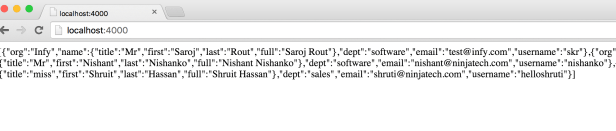
Now you can restart your node server and then try to access the application just by typing http://localhost:4000/, you should see the JSON printed for you as given below
Now , you can do more beautify of your code.:) Just replace the JSON.stringify(employees) as below
 var express = require('express'); // To require express library in the project
var app = express(); // Initialize express and assign to a variable app
var fs = require('fs');
var employees = []
fs.readFile('employees.json', {encoding: 'utf8'}, function(err, data){
if(err) throw err
JSON.parse(data).forEach(function(employee){
employee.name.full=employee.name.first+ ' '+employee.name.last;
employees.push(employee)
})
})
app.get('/', function(req, res){
var buffer = ''
employees.forEach(function(employee){
buffer+=''+employee.name.full +'
'
})
res.send(buffer)
})
var server = app.listen(4000, function(){
console.log('Server running at http://localhost:'+server.address().port)
})
var express = require('express'); // To require express library in the project
var app = express();      // Initialize express and assign to a variable app
var fs = require('fs');
var employees = []

fs.readFile('employees.json', {encoding: 'utf8'}, function(err, data){
	if(err) throw err

	JSON.parse(data).forEach(function(employee){
		employee.name.full=employee.name.first+ ' '+employee.name.last;
		employees.push(employee)
	})
})

app.get('/', function(req, res){
	var buffer = ''

	employees.forEach(function(employee){
		buffer+=''+employee.name.full +'
'
	})

	res.send(buffer)
})
var server = app.listen(4000, function(){
	console.log('Server running at http://localhost:'+server.address().port)
})
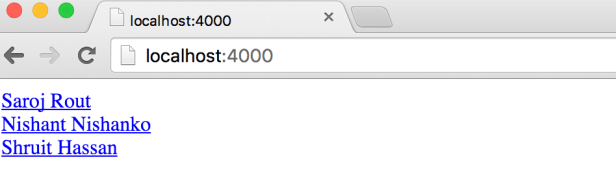
Now restart the server and try accessing the app. You see the output as below
Here is the Source code for reference NodeJSSample
 Your Ultimate Tech Guide